

Fingerprint Capturing & Uploading Guidelines
- May 24, 2021
- Posted by: admin
- Category: Pakistan Origin Card (POC)
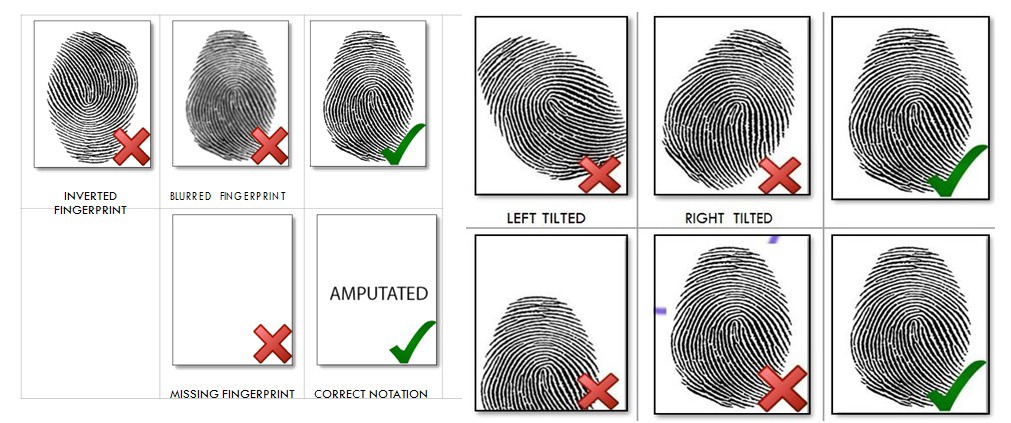
Below mentioned guidelines will assist you through the process of applying
fingerprints and uploading the form in the online application:
1. When applying fingerprints on paper, make sure that you do not roll the
fingers, slightly place fingerprint impressions (using inkpad) where required
2. Ensure fingerprints are not smudged. If the fingerprints are smudged, re-print
the verifier form and apply fingerprints again.
3. Ensure fingerprints are placed in correct sequence
4. Fill up the form completely and make sure that the information provided on
the form is correct to the best of your knowledge. Please note that providing
fake information or fake documents would lead to legal proceedings against
the applicant.
5. Once the form is filled, scan the form.
6. Ensure that the form is scanned at 600 DPI resolution and is not converted to
600 DPI through any software. Scan the form in gray scale, and save it in
JPG/JPEG format
7. The maximum limit for uploading the file is 3 MB. Ensure that the file size is
less than 3 MB
Google Business Link: https://www.google.com.pk/search?authuser=6&_ga=2.14683775.876478304.1619684134-99581744.1613243673&q=Online+Nadra+Card+Services+in+UK&ludocid=7892899136939401548&lsig=AB86z5U9NPIW6t6o5j1_gQskgO8A
Find us on maps: https://www.google.com/maps?cid=7892899136939401548&authuser=6&_ga=2.119475648.876478304.1619684134-99581744.1613243673
Homepage: https://nadra-online.co.uk/
Apply Online: https://nadra-online.co.uk/services/apply-now/
Contact Us: https://nadra-online.co.uk/contact-us/
Facebook: https://www.facebook.com/Nadraluton
Instagram: https://www.instagram.com/nadraluton/

